17% off




Anniv Promo EU-Schiff OBDSTAR MS50 Standard Motorcycle Diagnostic Scanner – Supports Moto Diagnosis, Odometer Recalibration & Tuning
Item No. SP365
In Stock.
History 16 sold.
Latest price: €578.00Buy Now: €482.00
17% off
✓ EU Warehouse ✓ VAT Invoice ✓Technical Support
OBDSTAR Anniv Promo,Do not Miss
2026 NEW ECU MASTER
Better Offer or Questions Pleaese Contact WhatsApp: +86 15223201143
E-Mail: sales@OBDSTARshop.de
OBDSTAR Anniv Promo,Do not Miss
2026 NEW ECU MASTER
Better Offer or Questions Pleaese Contact WhatsApp: +86 15223201143
E-Mail: sales@OBDSTARshop.de
Shipping:
Free Shipping
Express Shipping ServiceEstimated delivery time: 5-7 working days.See details »
Weight:
4.5KG
( 9.92LB )
Package:
44.8cm*34cm*13.2cm
( Inch: 17.64*13.39*5.2 )
Returns:
Return for refund within 30 days,buyer pays return shipping. Read details »
Related Download Files
Product Description
- Comprehensive Motorcycle Diagnostics – Supports fault diagnosis, odometer recalibration, and tuning for over 30 brands and thousands of models.
- Advanced Functions – Includes fault code reading/clearing, data stream monitoring, action tests, settings, and coding.
- User-Friendly Design – Portable tablet with a 5.0-inch capacitive touch screen and industrial-grade appearance for professional use.
- High Performance Hardware – Powered by an RK3128 quad-core processor for fast and efficient operation.
- Free Updates – Comes with 1 year of free software updates to keep diagnostics current.
OBDSTAR MS50 Standard Motorcycle Diagnostic Scanner – Supports Moto Diagnosis, Odometer Recalibration & Tuning
MS50 is a portable tablet which has super performance and industrial appearance design. It is a new generation of intelligent motorcycle diagnostic equipment tailored for customers. Based on RK3128 Quad-Core processor and equipped with a 5.0-inch capacitive touch screen, brings customer professional diagnosis experience.
Please check the vehicle model list before purchasing
MS50 STD COVERAGE 20260415
MS50 USER MANUAL
Function
1. New Android 5.1.1 operation system
2. Simple and intuitive menu guidance allows you to quickly master the equipment operation
3. Provide complete diagnostic functions including code reading, code clearing, data flow, action test, setting, coding, etc.
4. Menu Arbitrary selection is more convenient and quick
5. Record and play back real-time data streams, quickly and accurately locate sensor and component faults
6. Wi-Fi connection to the Internet, one-click software upgrade
7. One-Click remote function, OBDSTAR technical staff remote assistance
8. Support most of the Asia and Europe models
Advantage function
1. The first fault guidance, Help data, technical bulletin, diag socket, etc. help you diagnose accurately and efficiently
2. Diversified data stream display modes such as text, waveform diagram and instrument diagram, allowing you to easily analyze faults
3. Automatic scanning, automatic VIN recognition, control module programming and coding, ECU setting, instrument coding, tire pressure monitoring system, maintenance light reset, CO adjustment, idle speed adjustment, A/F value reset, ABS control unit setting , EOL mode, transmission memory reset, clear computer memory, etc.
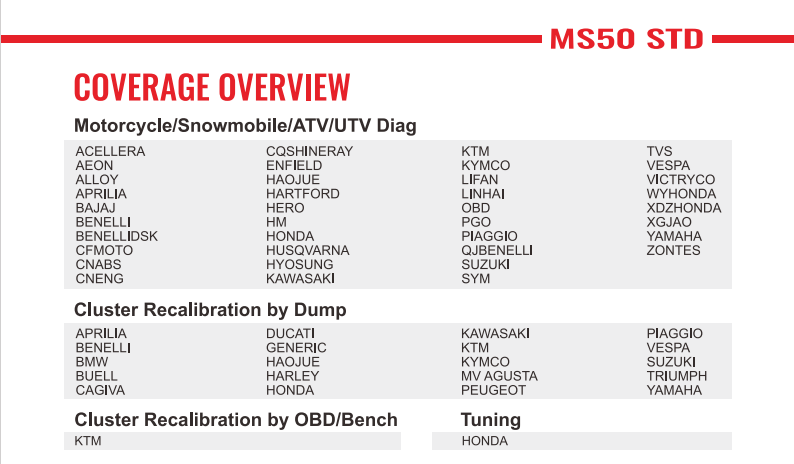
Supported Vehicles
Comparison Between MS50 Standard Version & MS50 Basic Version

MS80 vs MS50
| Item | MS80 | MS50 | ||
| Picture |   |
 |
||
| Diag Cable | High Quality,low price | High Quality,low price | ||
| Main machine | 8 inch android tablet | 5 inch android tablet,OBD charge | ||
| Plastic Cover | Industrial Design | Industrial Design | ||
Smart switch pin |
Highly integrated diagnostic connector | Highly integrated diagnostic connector | ||
| Diag Connector | OBD adapter, no need to disassemble | OBD adapter, no need to disassemble | ||
| Operation System | Android | Android | ||
| Wifi | one button click | one button click | ||
| Language | English | English | ||
| Remote assistance | Yes, engineer can assistant via remote control software | Yes, engineer can assistant via remote control software | ||
| Immobilizer | Europe | TRIUMPH | √ | |
| GILERA | √ | |||
| PEUGEOT | √ | |||
| PIAAGIO | √ | |||
| DUCATI | √ | |||
| VESPA | √ | |||
| America | HARLEY | √ | ||
| Motorcycle diagnosis | Asia | HONDA | √ | √ |
| KAWASAKI | √ | √ | ||
| KYMCO | √ | √ | ||
| SUZUKI | √ | √ | ||
| SYM | √ | √ | ||
| YAMAHA | √ | √ | ||
| MONTESA | √ | |||
| PGO | √ | √ | ||
| HARTFORD | √ | √ | ||
| AEON | √ | √ | ||
| BENELLIDSK | √ | |||
| Europe | APRILIA | √ | ||
| BENELLI | √ | √ | ||
| BMW | √ | |||
| DUCATI | √ | |||
| KTM | √ | √ | ||
| PIAGGIO | √ | √ | ||
| TRIUMPH | √ | |||
| VESPA | √ | √ | ||
| MALAGUTI | √ | |||
| GASGAS | √ | |||
| GILERA | √ | |||
| GUZZI | √ | |||
| AGUSTA | √ | |||
| DERBI | √ | |||
| America | HARLEY | √ | ||
| INDIAN | √ | |||
| VICTORY | √ | |||
| BRP | √ | |||
| OBD | OBD-II | OBD | √ | √ |
| Motorboat diagnosis | Asia | HONDABOAT | √ | |
| Comparison of accessories | ||||
| M001 | Main Cable | √ | √ | |
| M002 | Power Cable | √ | √ | |
| M002A | GND | √ | ||
| M003A | Multi functional jumper | √ | √ | |
| M004 | APRILIA/DUCATI/HONDA/KTM/PIAGGIO/VESPA/YAMAHA | √ | √ | |
| M005 | KAWASAKI | √ | √ | |
| M006 | KAWASAKI | √ | ||
| M012 | SUZUKI | √ | √ | |
| M015A | HONDA/HONDA MONTESA | √ | √ | |
| M018 | YAMAHA | √ | √ | |
| M019 | KTM | √ | √ | |
| M021 | AEON/BENELLI/BENELLI DSK | √ | √ | |
| M026 | SYM | √ | √ | |
| M027 | KYMCO/KAWASAKI | √ | √ | |
| M028 | pgo | √ | ||
| M030 | HARDFORD | √ | ||
| M034 | HARLEY-DAVIDSON | √ | ||
| M037 | DUCATI | √ | ||
| M040 | BMW | √ | ||
| M041 | EURO V | √ | √ | |
| M042 | INDIAN/VICTORY | √ | ||
| M043 | BRP | √ | ||
| P001 | IMMO KIT(Optional) | |||
| 12V2A | CHARGER | √ | √ | |
| Support system | 1. Comparable to the original factory 2. Full coverage of engine, ABS, traction control, airbag, instrumentation, power steering, alarm, chassis management, body, headlights, battery management, tire pressure, frame, anti-theft, suspension, radio, handle, and other systems |
1. Comparable to the original factory 2. Full coverage of engine, ABS, traction control, airbag, instrumentation, power steering, alarm, chassis management, body, headlights, battery management, tire pressure, frame, anti-theft, suspension, radio, handle, and other systems |
||
| Advanced Function | Comparable to the original factory (automatic scanning, automatic VIN recognition, control module programming and coding, ECU setting, instrument coding, tire pressure monitoring system, maintenance light reset, CO adjustment, idle speed adjustment, A/F value reset, ABS control unit Settings, EOL mode, transmission memory reset, clear computer memory, etc.) | Comparable to the original factory (automatic scanning, automatic VIN recognition, control module programming and coding, ECU setting, instrument coding, tire pressure monitoring system, maintenance light reset, CO adjustment, idle speed adjustment, A/F value reset, ABS control unit Settings, EOL mode, transmission memory reset, clear computer memory, etc.) | ||
| Diagnostic connector location | √ | √ | ||
| Diagnostic connector Display | √ | √ | ||
| Technical Bulletin | √ | √ | ||
| Fault Guidance | √ | √ | ||
| Data Flow Text/ Waveform Diagram | √ | √ | ||
| Instrument Diagram | √ | √ | ||
| Any menu back | √ | √ | ||
| Interactive Circuit diagram | √ | -- | ||
| Components Description | √ | -- | ||
Parameters
Operation System: Android 5.1.1
CPU: Exynos4418 Dual Core ARM Cortex A9
Battery: 2500mA, rechargeable polymer lithium battery
Extension memory card: 32G Micro SD (TF) card supported
Storage capacity: 16GB
LCD:5.0 inch
LCD resolution: 800*600
Touch screen: capacitive touch screen
Wifi: supported
Working temperature: -20℃~55℃(14℉~131℉)
Storage temperature: -20℃~70℃(-4℉~158℉)
Weight: 700g(Main Unit)
Dimension: 140mm*89mm*18mm
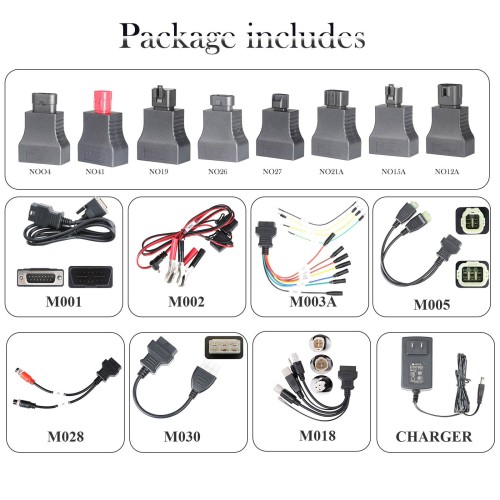
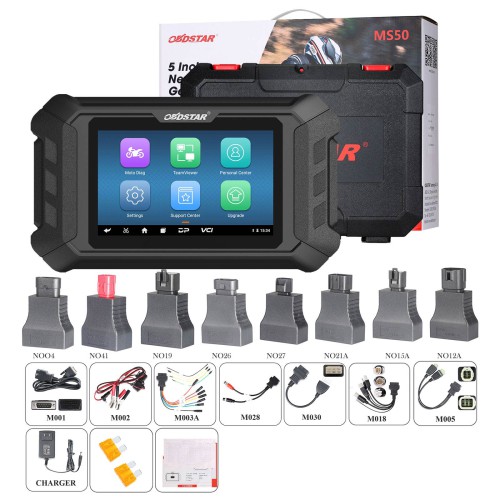
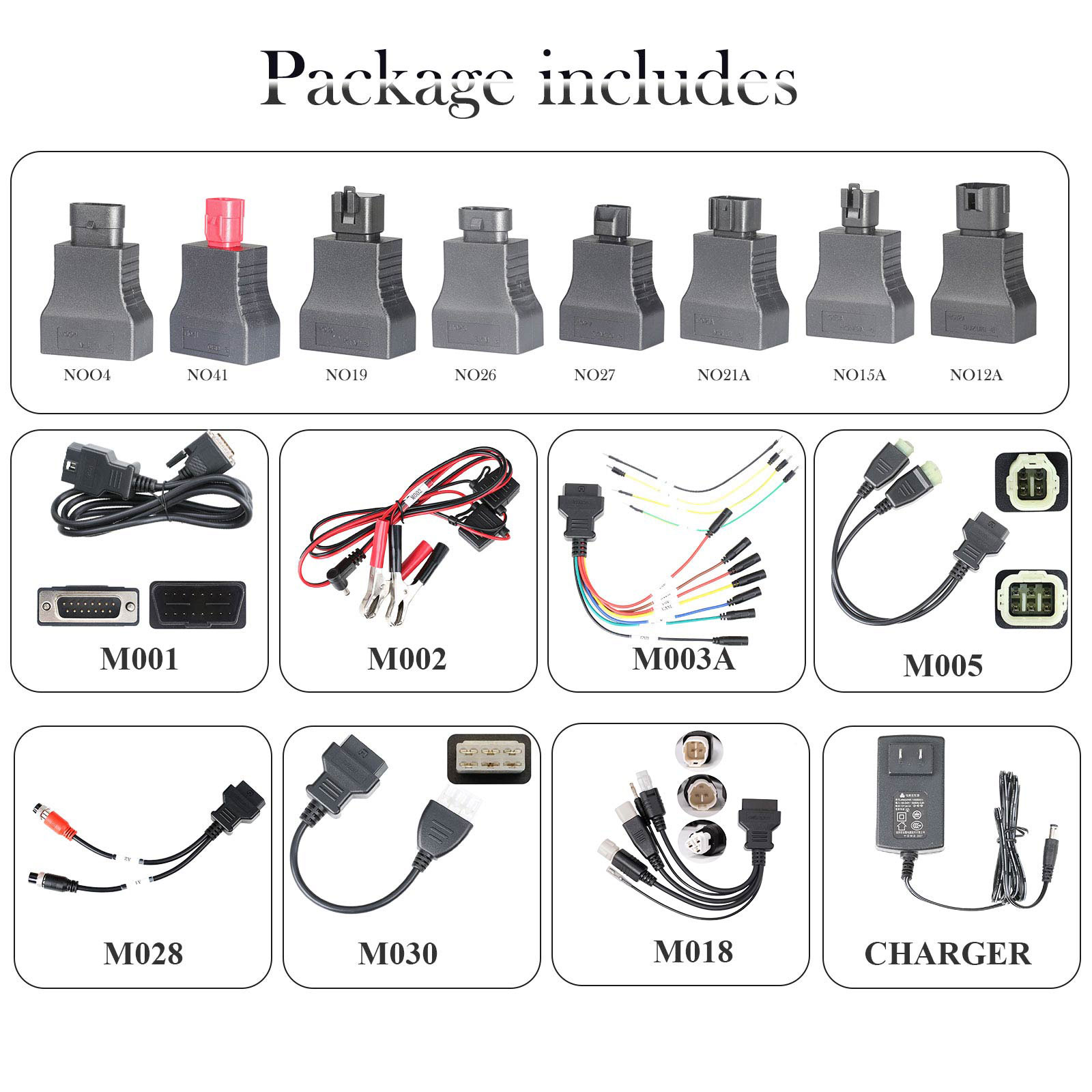
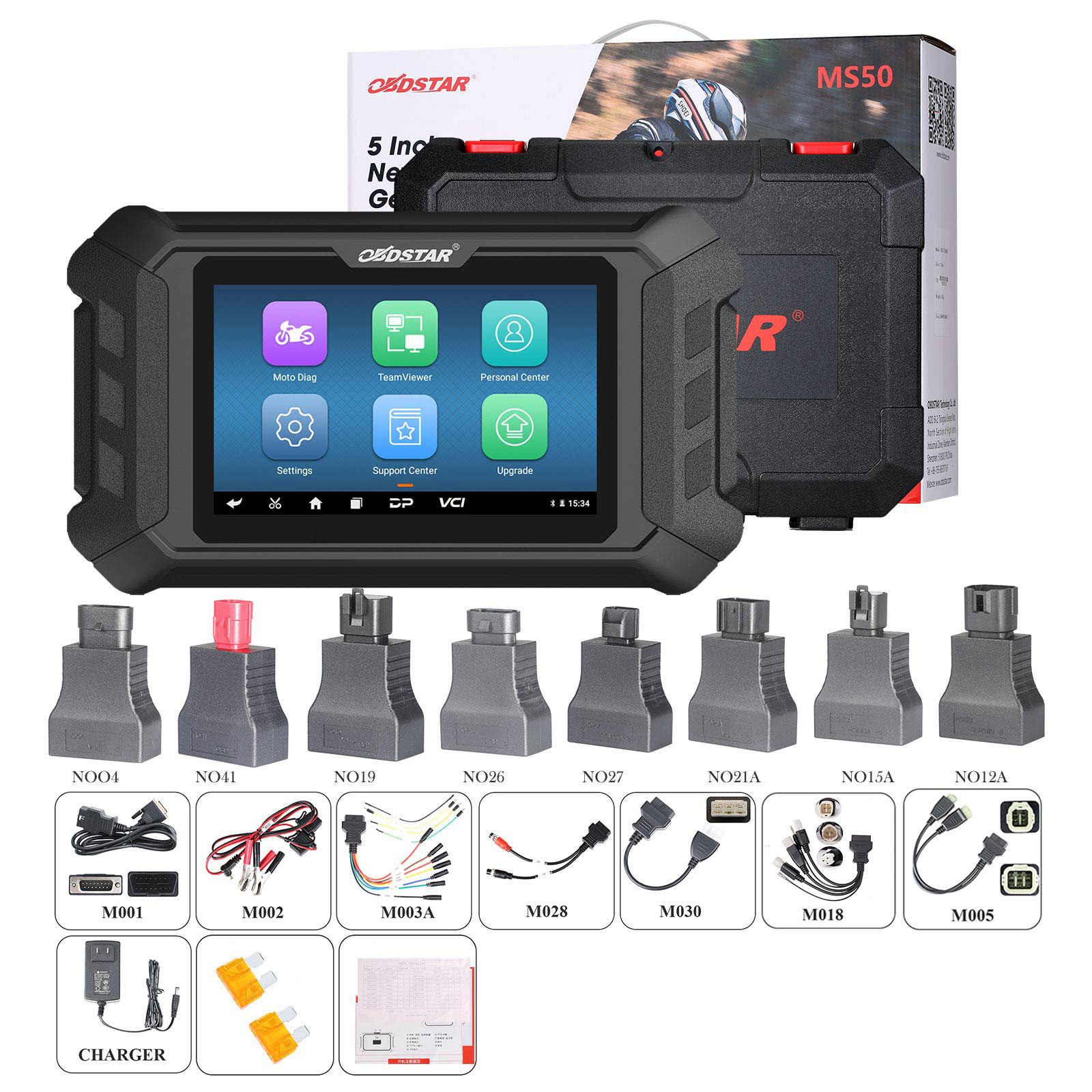
Package Includes:
1pc x M001 Main Cable
1pc x M002 Power Cable
1pc x M003A Multi-functional Jumper
1pc x M005 KAWASAKI
1pc x M018 YAMAHA
1pc x M028 PGO
1pc x M030 HARTFORD
1pc x 12V2A CHARGER
1pc x NOO4 Adapter
1pc x NO41 Adapter
1pc x NO19 Adapter
1pc x NO26 Adapter
1pc x NO27 Adapter
1pc x NO12 Adapter
1pc x NO15A Adapter
1pc x NO21A Adapter

Über die Lieferung
Versand aus EU-Lager (steuerfrei): 3–5 Werktage. Wir haben beliebte Artikel in unserem EU-Lager (Deutschland/Tschechische Republik/Belgien) vorrätig, was für Sie bequemer ist. Steuerfrei, schneller Versand und günstigerer Preis.Yanwen Express (ohne Steuern): 8–12 Werktage, wir zahlen die Steuern im Voraus, sodass Kunden für die meisten europäischen Länder keine Steuern zahlen müssen. Aufgrund der hohen EU-Zölle versenden wir standardmäßig mit Yanwen Express (für Artikel, die nicht in der EU vorrätig sind). Wenn Kunden die schnellere Versandart DHL/Fedex wünschen und bereit sind, die hohen Steuern zu zahlen, hinterlassen Sie uns bitte nach der Bestellung rechtzeitig eine Nachricht.
DHL/UPS/Fedex: 5-7 Werktage. Um Ihnen bei der Zollabfertigung zu helfen, geben wir auf der Rechnung einen niedrigeren Preis an. Bei Adressen in abgelegenen Gebieten muss der Kunde eine Fernfrachtgebühr entrichten, andernfalls versenden wir per Normalpost oder Yanwen Express.
Hinweis:
1. Alle Artikel werden an die PAYPAL-Lieferadresse versandt, um die Rechte von Käufer und Verkäufer zu schützen. Bitte überprüfen Sie Ihre Adresse bei PAYPAL, bevor Sie den Kauf tätigen.
2. Ihre Bestellung wird in der Regel am selben oder am nächsten Werktag nach Zahlungseingang versandt, außer an Wochenenden und Feiertagen.
Wenn Sie Fragen haben, zögern Sie bitte nicht, uns zu kontaktieren.
Kontaktinformationen:
E-Mail: sales@OBDSTARshop.de
WhatsApp: +86 15223201143
Tech Support
Learn how to safely upgrade your OBDSTAR MS50 firmware without losing data. Our step-by-step guide shows you the complete backup process and firmware update procedure to keep your device working perfectly.
Today we will learn how to upgrade the firmware of the device(Demostration with OBDSTAR MS50)Preparation:
MS50 Scanner
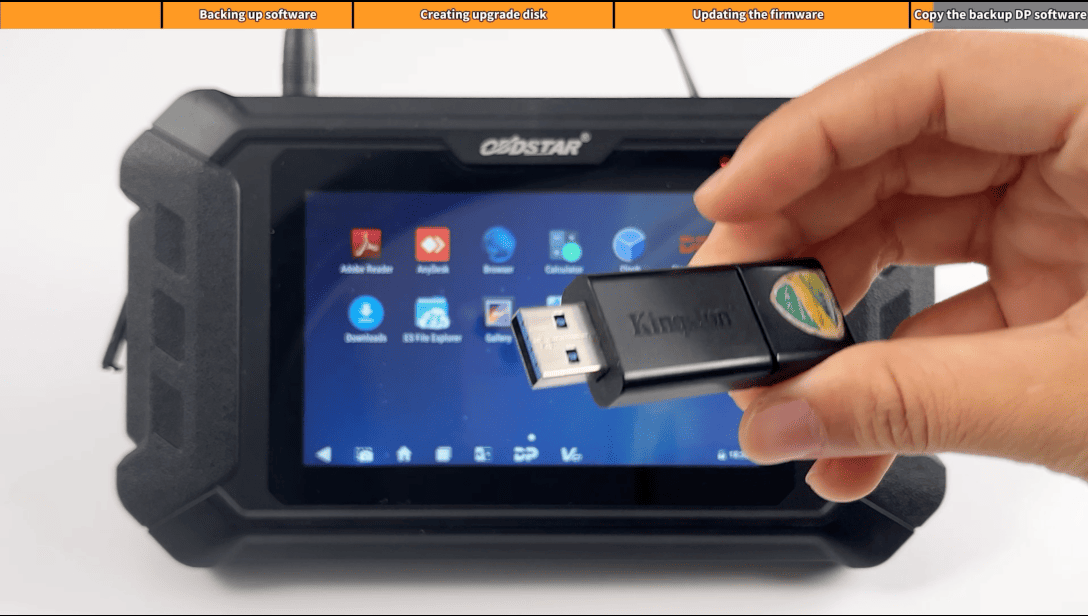
USB disk with a size of 16G or above (for data backup)
Card reader
TF memory card with a size of 1G or above(TF car can only be used for firmware upgrade)
12V 2A Charger
Steps:
Step1: Back up DP Software
We first use the USB disk to back up all the files in the device during the firmware upgrade process, all setting in the device
and all software and files in the DP will be cleared. Users who have expired can not upgrade the firmware through one-click upgrade, you also need ti back up the software in the device
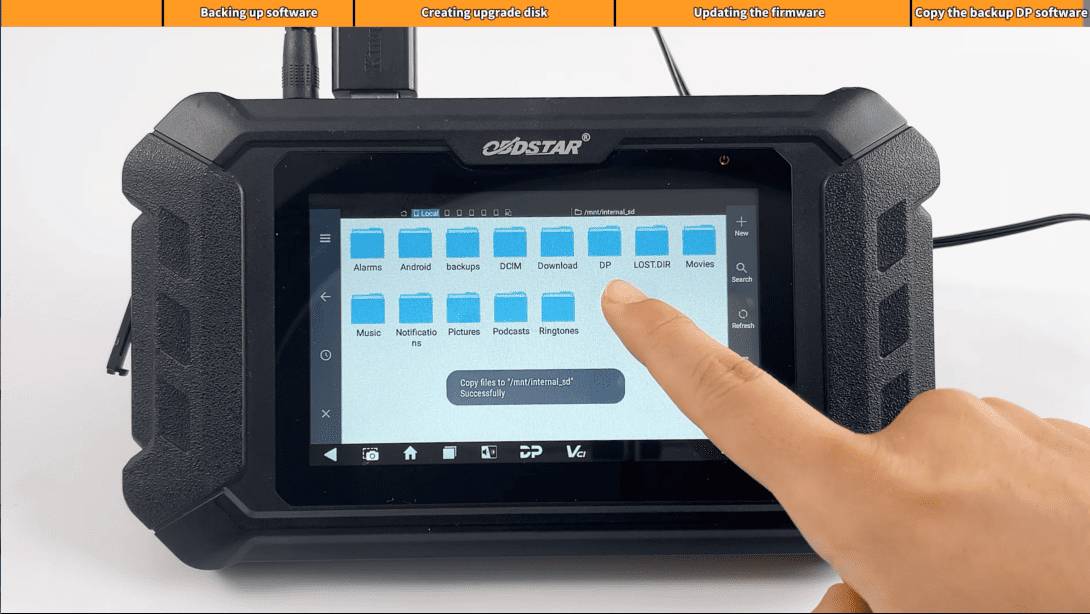
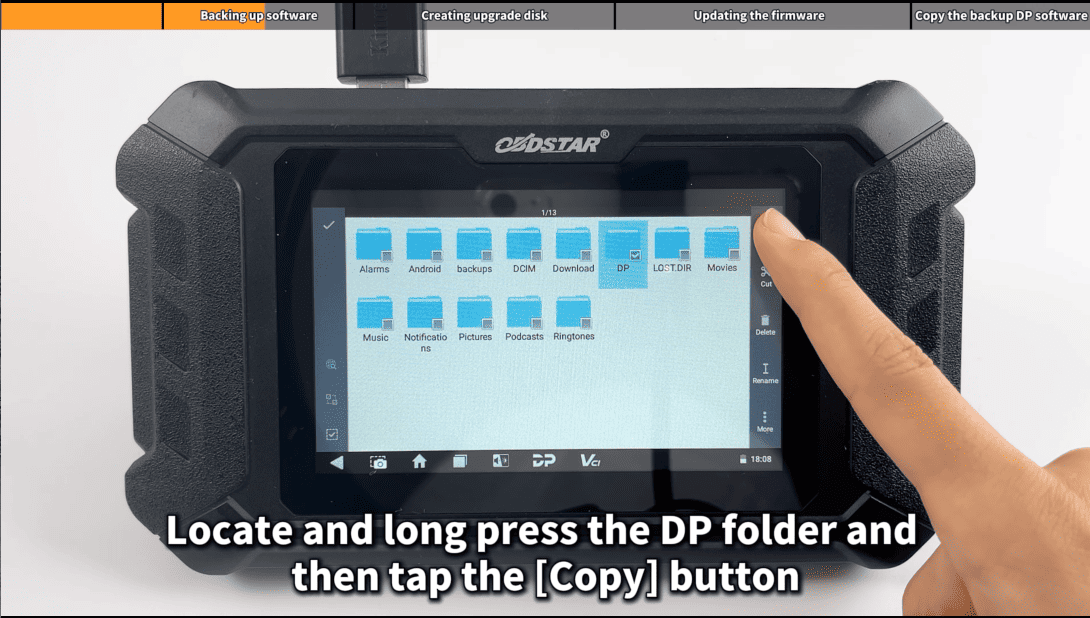
Enter the main menu and insert the USB disk, then locate and long press the DP folder and then tap the [Copy] button
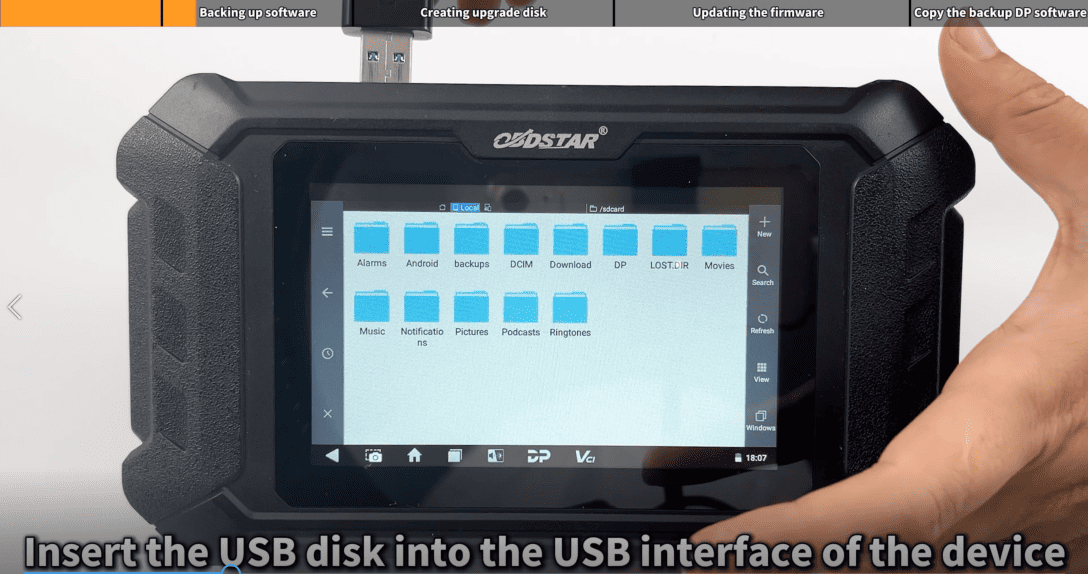
Step2:Creating upgrade disk
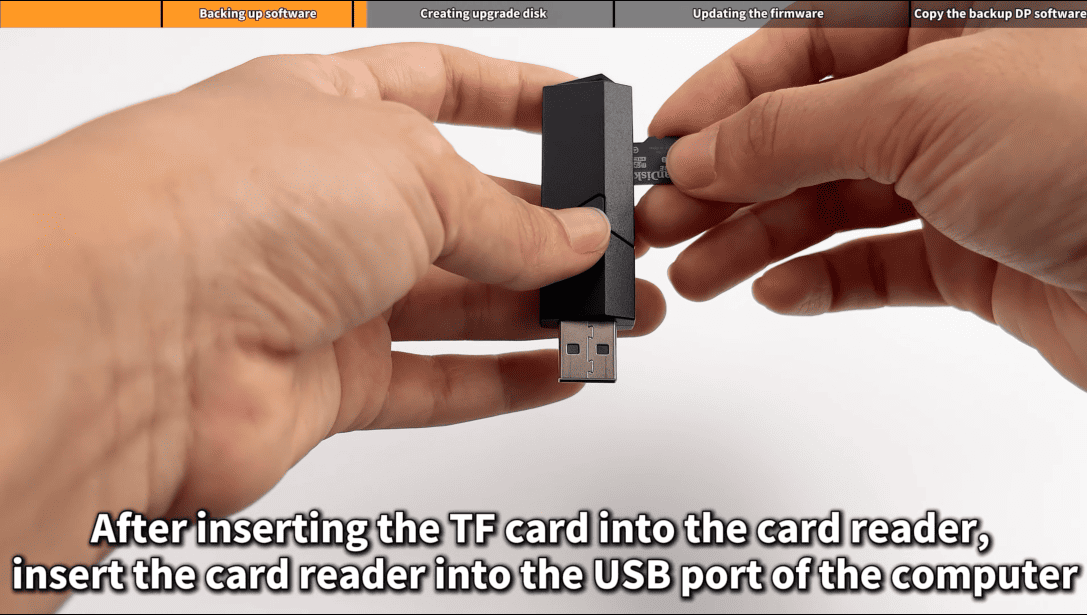
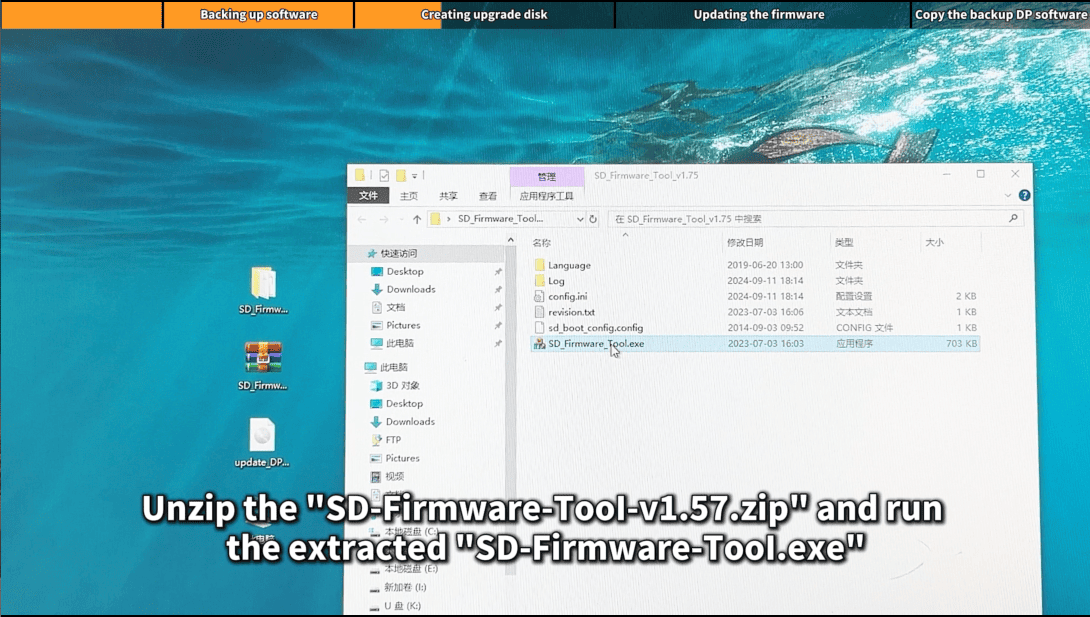
After inserting the TF car into the card reader, insert the card reader into the USB port of the computer, then unzip the "SD-Firmware-Tool-v1.57.zip" and run the extracted "SD-Firmware-Tool.exe"
Click the [Create] button to start writing the firmware file to the TF card
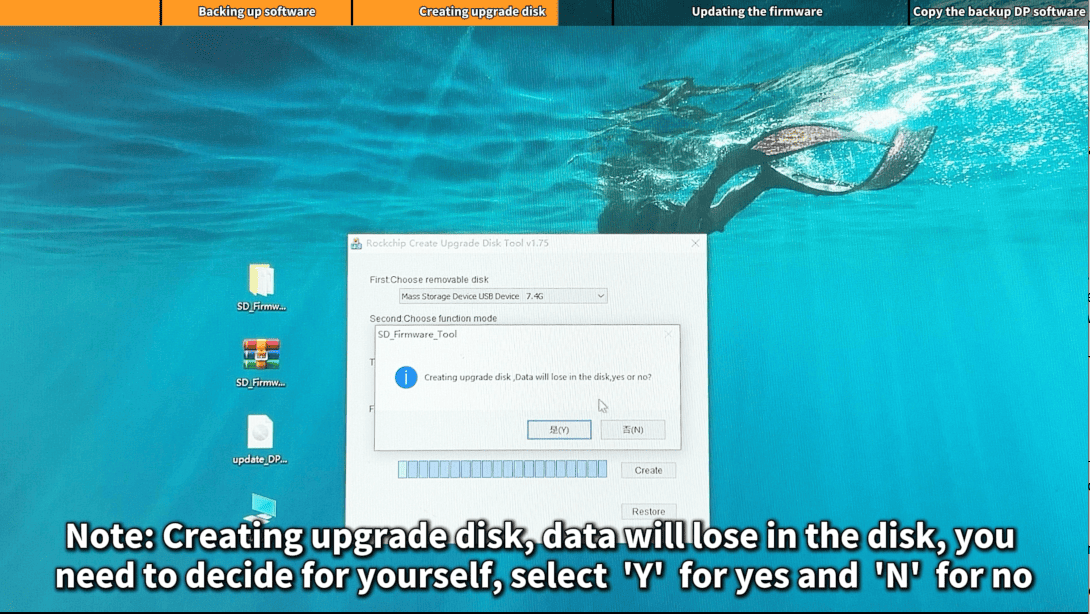
Note: Creating upgrade disk, data will lose in the disk, you need to decide for yourself, select 'Y' for yes, 'N' for no
Step3: Upgdating the firmware
First, we connect the power to the device and make sure the power indicate light is on(Do not power off during the upfrade process)
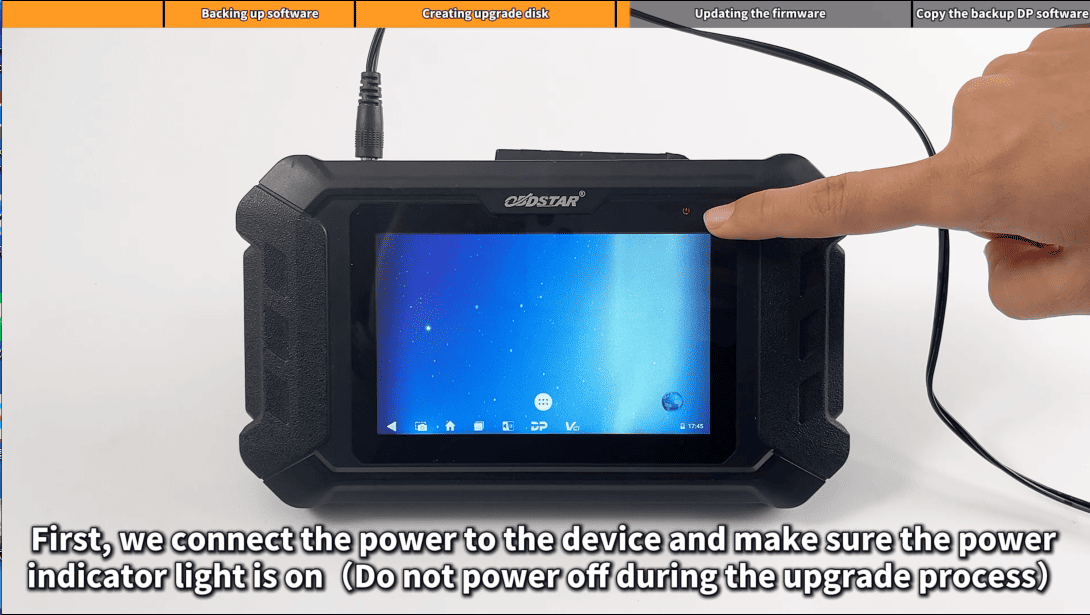
1) Insert TF card into the device
2) Long press the device power button and select "Reboot"
3) When the screen displays "Doing Actions successed, please remove the sdcard", remove the TF card from the device. The device will automatically reboot and enter the system
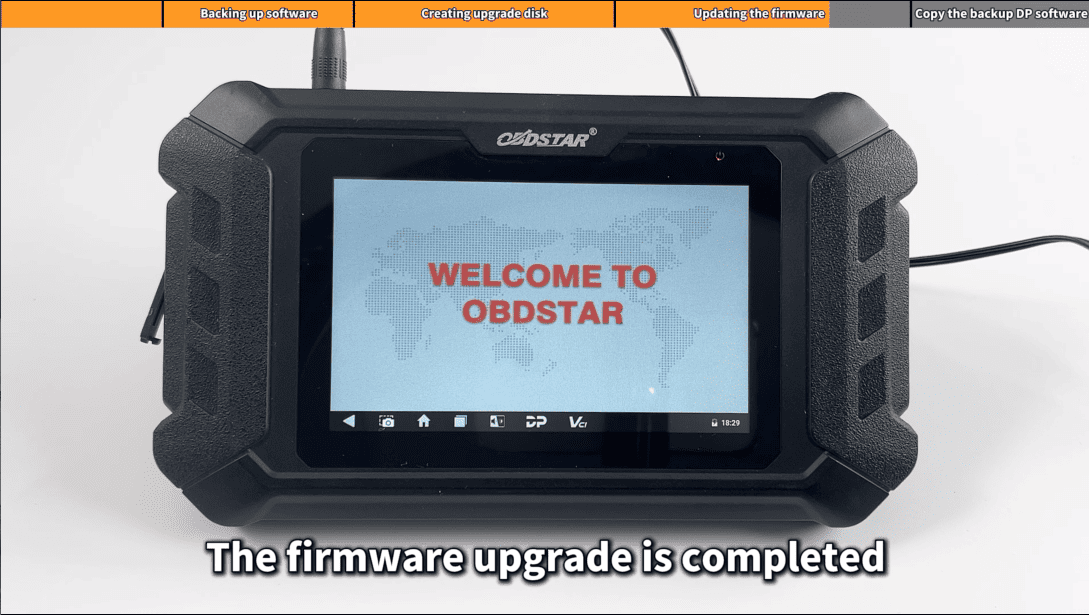
Note: Users whose membership has expired need to copy the original backup DP software, otherwise it will not work properly
Step4: Copy the backup DP software