


Anniv Promo EU-Schiff OBDSTAR iScan DUCATI with M041 Cable Support up to 2024 Ducatis for Diagnose & Key Programming & Service Light Reset

OBDSTAR Anniv Promo,Do not Miss
2026 NEW ECU MASTER
Better Offer or Questions Pleaese Contact WhatsApp: +86 15223201143
E-Mail: sales@OBDSTARshop.de
Related Download Files
Product Description
OBDSTAR iScan DUCATI with M041 Cable
This package includes OBDSTAR iScan DUCATI with M041 Cable
Please follow OBDSTAR iScan Ducati user manual to register it before you use it
Please check the OBDSTAR iScan Ducati vehicle list(20260415)
OBDSTAR iScan DUCATI Description:
OBDSTAR iScan DUCATI is a professional DUCATI motorcycle diagnostic scanner. It is a portable tablet with stylish appearance. Designed with ingenuity and practicality, it is a perfect tool for DUCATI motorcycle maintenance and repair. Based on RK3128 quad-core processor and equipped with a 5.0-inch capacitive touch screen, OBDSTAR iScan DUCATI brings its customers professional diagnostic experience and good user experience.
OBDSTAR iScan DUCATI is a new generation of intelligent motorcycle diagnostic equipment which supports automatic scanning, VIN recognition, control module programming and coding, ECU setting, instrument coding, tire pressure monitoring system, maintenance light reset, CO adjustment, idle speed adjustment, A/F value reset, ABS control unit setting , EOL mode, transmission memory reset, clear computer memory and key programming, etc
Support DUCATI diagnosis and key programming
- Intelligent Motorcycle Diagnostic Equipment for Ducati
- Simple and intuitive menu guidance allows you to quickly understand how to use the tablet;
- Provide complete diagnostic functions including code reading, code clearing, data flow, action test, setting, coding etc;
- Menu selection is more convenient and quicker;
- Record and play back real-time data streams, quickly and accurately locate sensor and component faults;
- Support 1 year free update, after 1 year cost 100USD/year update ( device expired within 7 days get 40% off for update, check Ducati Update Service)
- Wi-Fi connection to the internet, one-click software upgrade
- One-click remote help function, OBDSTAR technical staff offer remote assistance.
- Lightweight and portable, your motorcycle repair helper.
- Language support: ES (Spanish), PT (Portuguese), FR (French), DE (German), IT (Italian), PL (Polish), RU (Russian), TR (Turkish), ID (Indonesian) , FA (Persian) The default language is English. After registering, you can select the language you wanna
OBDSTAR M041 Cable for Ducati EURO V Motorcycle
Compatible with MS80, MS50, iScan Ducati and ODO Master.
When should the M041 cable be used?
1. When connect 2019- Ducati motorcycle
2. When correct mileage for some Ducati models
Package Includes:
1pc x iScan DUCATI Main Unit
1pc x M001A Main Cable
1pc x M002 Power Cable
1pc x N004 Adapter
1pc x M037 DUCATI Cable
1pc x 12V2A Charger
1pc x Quick Start Guide
1pc x M041 Cable
Über die Lieferung
Versand aus EU-Lager (steuerfrei): 3–5 Werktage. Wir haben beliebte Artikel in unserem EU-Lager (Deutschland/Tschechische Republik/Belgien) vorrätig, was für Sie bequemer ist. Steuerfrei, schneller Versand und günstigerer Preis.Yanwen Express (ohne Steuern): 8–12 Werktage, wir zahlen die Steuern im Voraus, sodass Kunden für die meisten europäischen Länder keine Steuern zahlen müssen. Aufgrund der hohen EU-Zölle versenden wir standardmäßig mit Yanwen Express (für Artikel, die nicht in der EU vorrätig sind). Wenn Kunden die schnellere Versandart DHL/Fedex wünschen und bereit sind, die hohen Steuern zu zahlen, hinterlassen Sie uns bitte nach der Bestellung rechtzeitig eine Nachricht.
DHL/UPS/Fedex: 5-7 Werktage. Um Ihnen bei der Zollabfertigung zu helfen, geben wir auf der Rechnung einen niedrigeren Preis an. Bei Adressen in abgelegenen Gebieten muss der Kunde eine Fernfrachtgebühr entrichten, andernfalls versenden wir per Normalpost oder Yanwen Express.
Hinweis:
1. Alle Artikel werden an die PAYPAL-Lieferadresse versandt, um die Rechte von Käufer und Verkäufer zu schützen. Bitte überprüfen Sie Ihre Adresse bei PAYPAL, bevor Sie den Kauf tätigen.
2. Ihre Bestellung wird in der Regel am selben oder am nächsten Werktag nach Zahlungseingang versandt, außer an Wochenenden und Feiertagen.
Wenn Sie Fragen haben, zögern Sie bitte nicht, uns zu kontaktieren.
Kontaktinformationen:
E-Mail: sales@OBDSTARshop.de
WhatsApp: +86 15223201143
Tech Support
This guide explains how to perform OBDSTAR DP5x firmware update, DP7x firmware update, and MD7x firmware update, along with visual references from the original documentation.
Here we take iScan Ducati motorcycle tool as an example.
Step 1: Back Up DP Software
Warning: The firmware upgrade will erase all settings and DP software from the device. Expired users cannot re-download software via one-click upgrade, so you must back up the software first.
Insert a TF card (≥16 GB) into the device for backup.
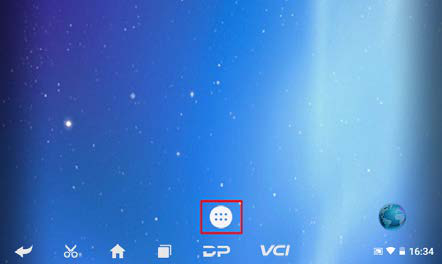
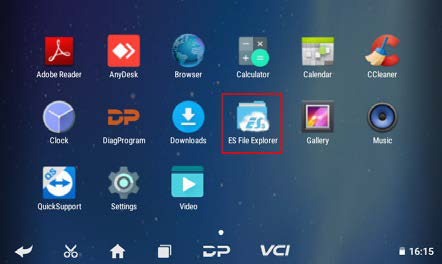
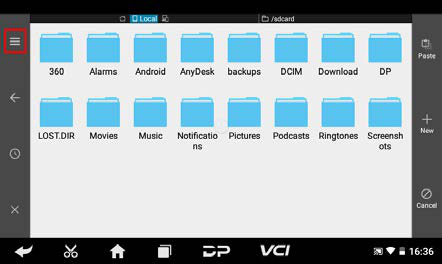
On the home screen, tap the menu button and open ES File Explorer.
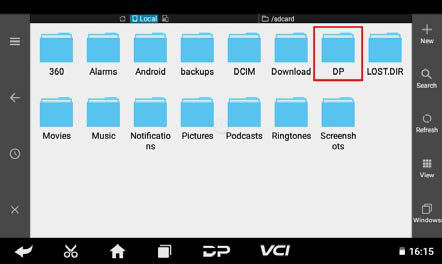
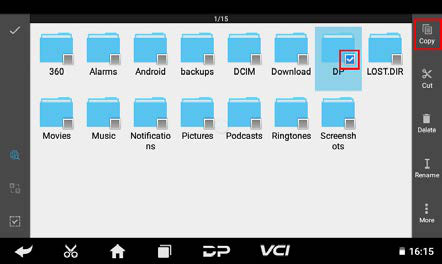
In ES File Explorer, long-press the DP folder, then tap Copy.
Tap the menu button, expand Local, and select Home.
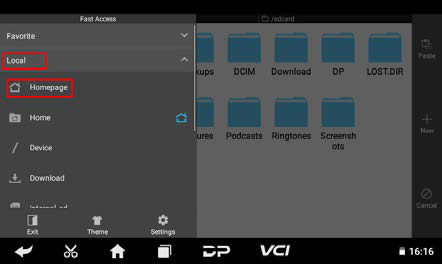
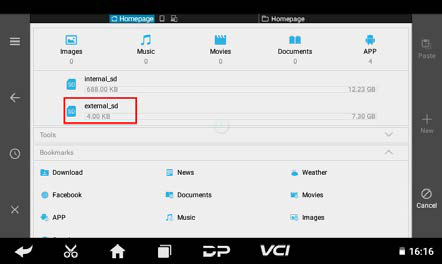
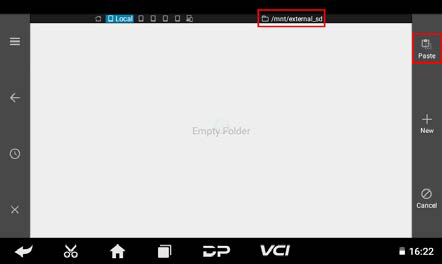
Select the external TF card and tap Paste. Wait for the copy to complete. After upgrading, simply overwrite the DP folder back to the device from the TF card.
Step 2: Preparations
Firmware file – Format: update_dp(xx)_(yyyymmdd).img (e.g., update_dp50_20211221.img).
A TF card (≥1 GB) and card reader – All data on the card will be erased during the process. Back up important files first.
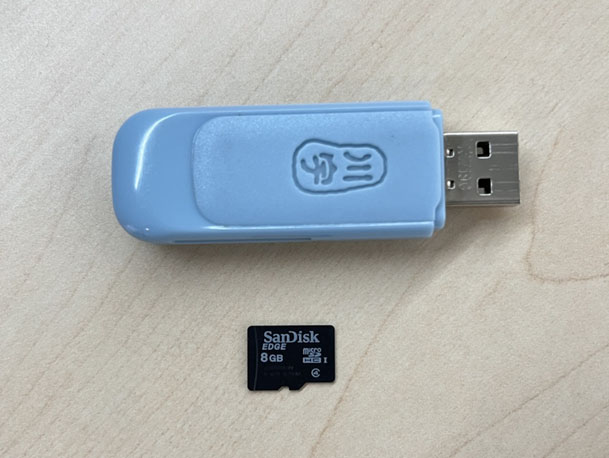
Step 3: Create the Upgrade TF Card
Warning: All files on the TF card will be deleted. Back up important data beforehand.
Ensure your computer recognizes the TF card and displays its capacity.
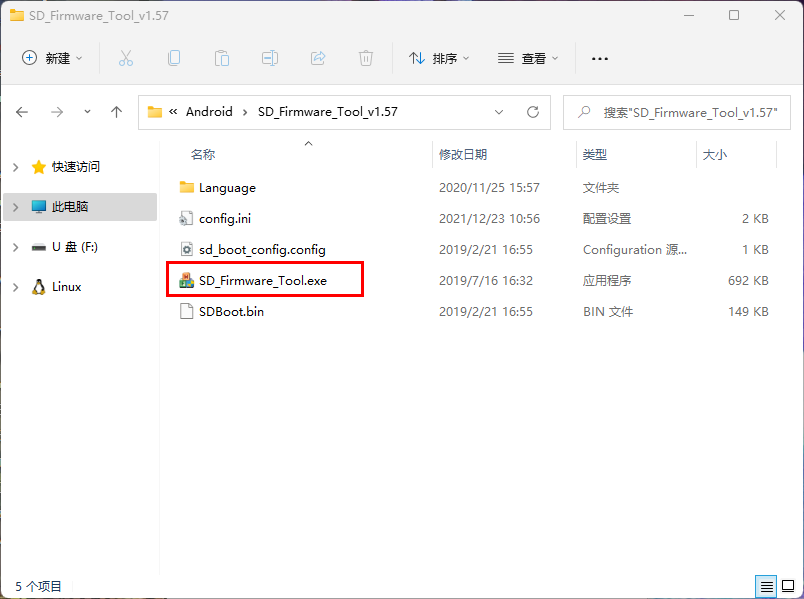
Click Firmware to select the firmware file.
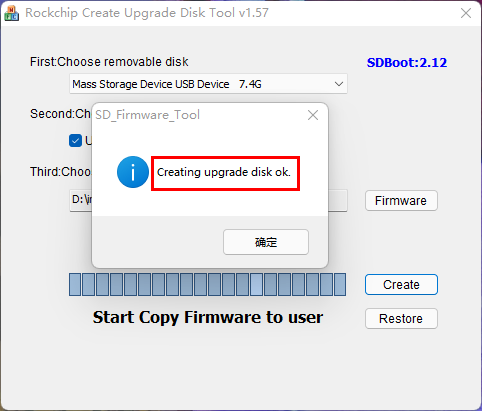
Click Create to write the firmware to the TF card.
Wait for the "Creating upgrade disk ok" message, indicating the bootable TF card is ready.
Step 4: Perform the Firmware Update
Warning: Connect the device to a power adapter and ensure the power LED is on. Do not power off during the upgrade.
Insert the prepared TF card into the device.
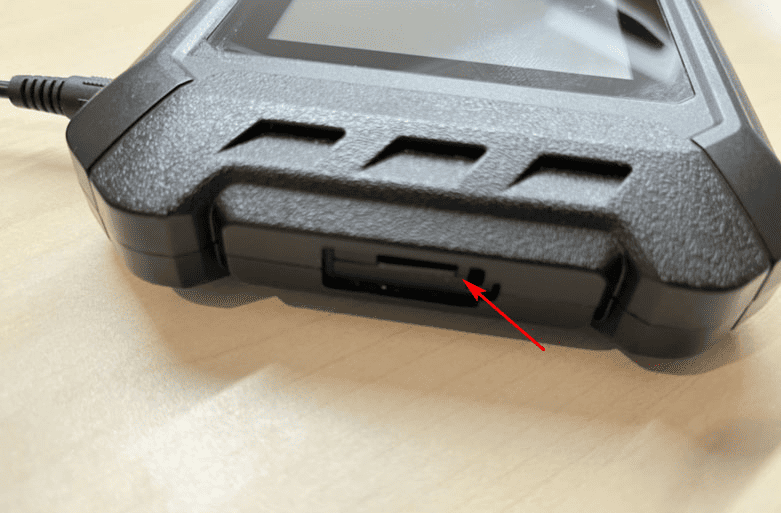
Confirm the power adapter is connected and the LED is on. Long-press the power button and select Restart.
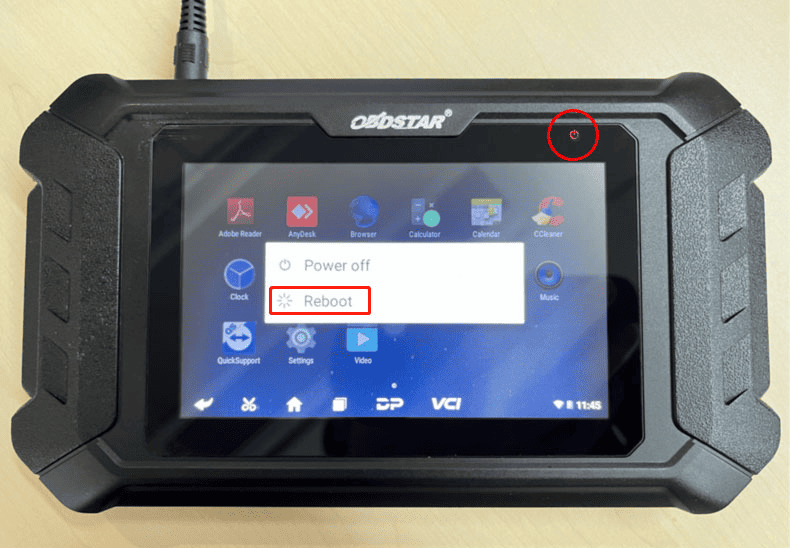
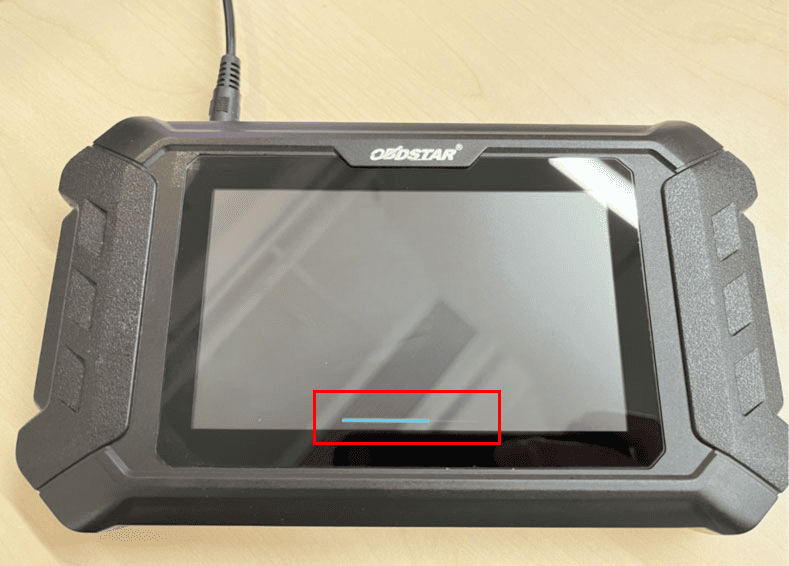
The device will automatically start the firmware upgrade. A progress bar will appear—wait patiently.
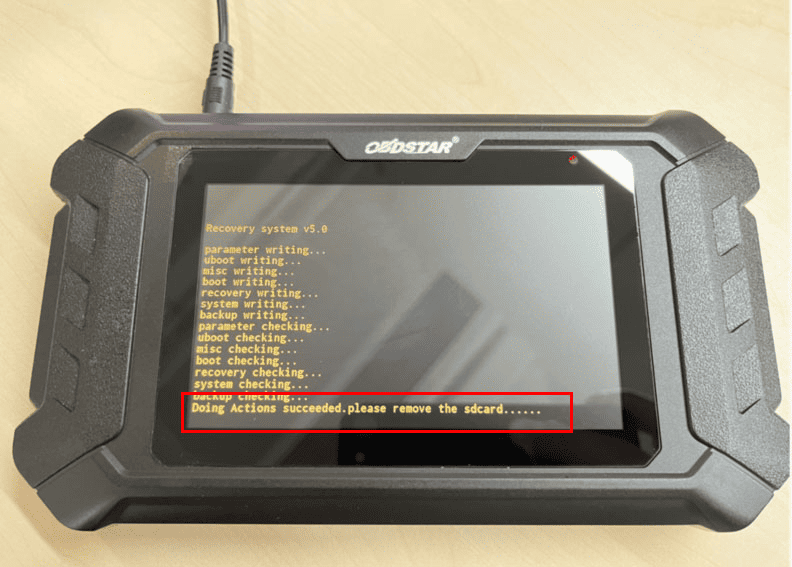
When the screen shows "Doing Actions successful. Please remove the sdcard," remove the TF card. The device will reboot automatically.
The firmware upgrade is now complete.
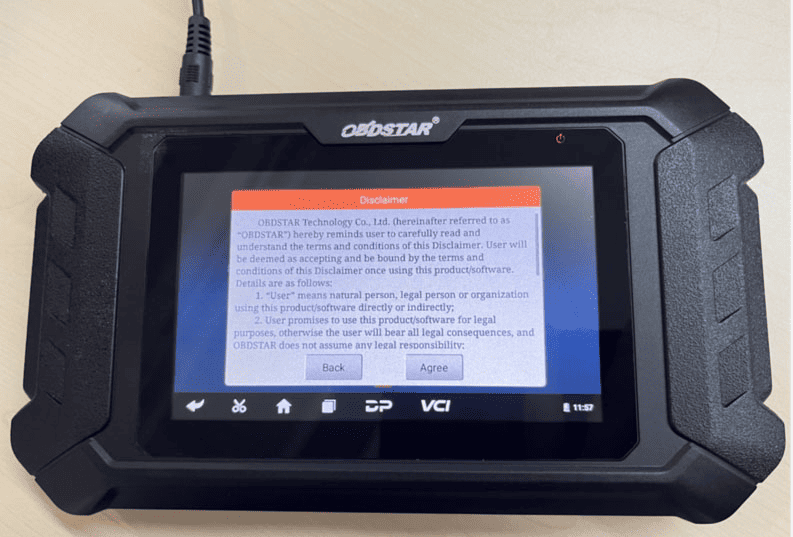
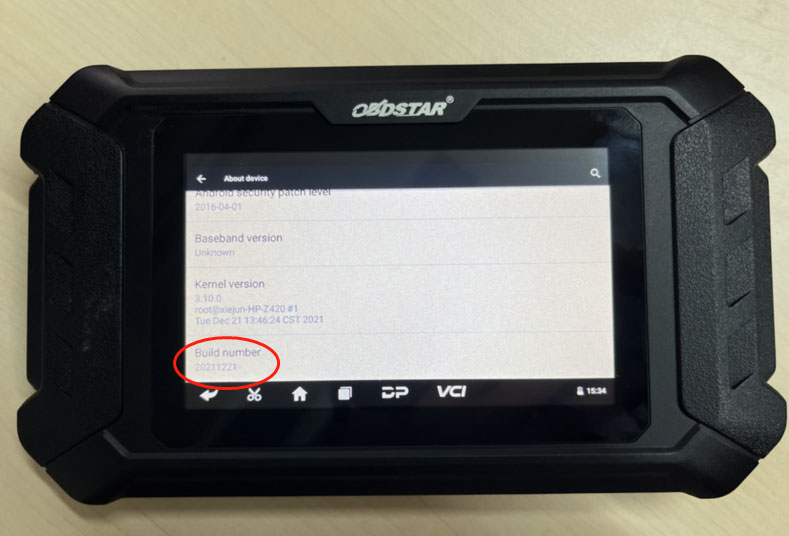
Step 5: Verify the Firmware Version
Open Settings → About Device → Build Number to confirm the current firmware version.
This guide covers the complete process for safely upgrading the firmware on DP5x, DP7x, and MD7x series devices. Always back up your data and maintain power during the update to avoid device failure.